The right compromise between flexibility and precision
What is a hybrid theme?
One hybrid theme is a theme that has a "classical" structure but also supports certain features of the ESF (Full Site Editing or Site Editor in French). Within a hybrid theme, we therefore find both PHP templates, HTML templates, a theme.json file and custom CSS style. But there is also partial access to the Site Editor as well as to "old" screens, such as Menus for example. In a block-based theme ("FSE"), more PHP files or custom styles: everything is done in HTML files for templates, and in the theme.json for style and configuration. There is also no more access to old screens (menus, widgets, customizer, etc.).
The benefits of the hybrid theme for agencies and their clients
The hybrid theme offers a clever combination of flexibility, precision and unified interface, benefiting web agencies and their customers.
Flexibility
The hybrid theme remarkable flexibility, allowing users to acquire moreautonomy. Customers can take charge of specific parts of their sites via the Site Editor during developments, thereby gaining independence to customize specific areas of their site – a sidebar, a footer or a specific section.
Accuracy
However, during the creation of a custom theme, there may be models that are not intended to be modified via the dashboard, or advanced features to be implemented. The hybrid theme perfectly meets this need by providing accurate management of editable parts in the Site Editor while maintaining control over the main models administered in PHP. A typical example would be the management of the site header and the Navigation Block, which, although offering more and more options, remains limited for the implementation of advanced navigations, such as a mega menu. In this context, it is best to manage this part in a more traditional way, with traditional menus, customizable, in a PHP file.
Unified interface
No more unsophisticated (made-in-house or with ACF) options for managing the elements of a footer, or widgets areas for editing a sidebar. This was one of the project's objectives. Gutenberg : offer a unified editing interface. The hybrid theme, as well as a block-based theme, makes it possible to take advantage of this interface, offering our customers the comfort of using the same interface and blocks to edit their publications as well as areas of the site such as footer or sidebar.
Case study: the redesign of the beapi.fr website with a hybrid theme
In 2023, the theme of the site of theWordPress agency beapi.fr has been recast, adopting a hybrid theme.
Objectives
The transformation aimed to make a classic theme more flexible, aging, thus facilitating the modification of specific elements by the contributors of the site – such as the footer, the headers of the blog's archive pages, and those of the client cases. Performance and accessibility issues were also taken into account.
Limitations
We had to keep a navigation in the form of a mega menu, and that it was accessible. On the other hand, although flexibility on the contribution side is needed, full editing of the archive models from the dashboard was not required. Thus, the hybrid theme quickly became the most suitable solution for our use case.
Technical implementation
Our hybrid theme was to enable us to edit model elements in the Site Editor, without giving us access to the editing of the models as a whole, which are managed in PHP. Our hybrid theme was designed to enable the editing of model elements in the Site Editor, while limiting access to the complete edition of the models as a whole, managed in PHP.
Model element support
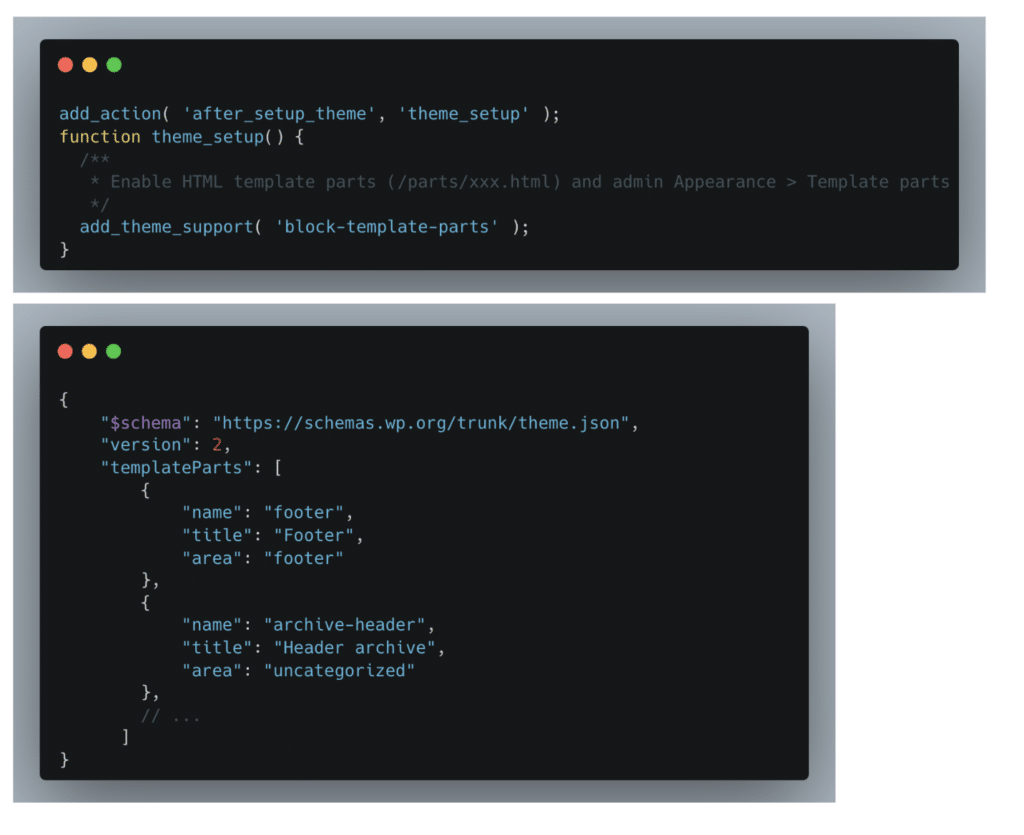
To enable support for model elements only, adding ‘block-template-parts' support at the theme level, with declaration in the theme.json file, was necessary. This allows the template elements placed in the /parts/xxx.html theme folder to be recognized, and editable in Appearance > Model Elements. The theme.json file will also contain other settings and styles of the theme.
Viewing model elements
As the model elements were declared, they had to be displayed in PHP models. WordPress proposes a native function, block template part, where the model element name is simply passed.

Editing model elements
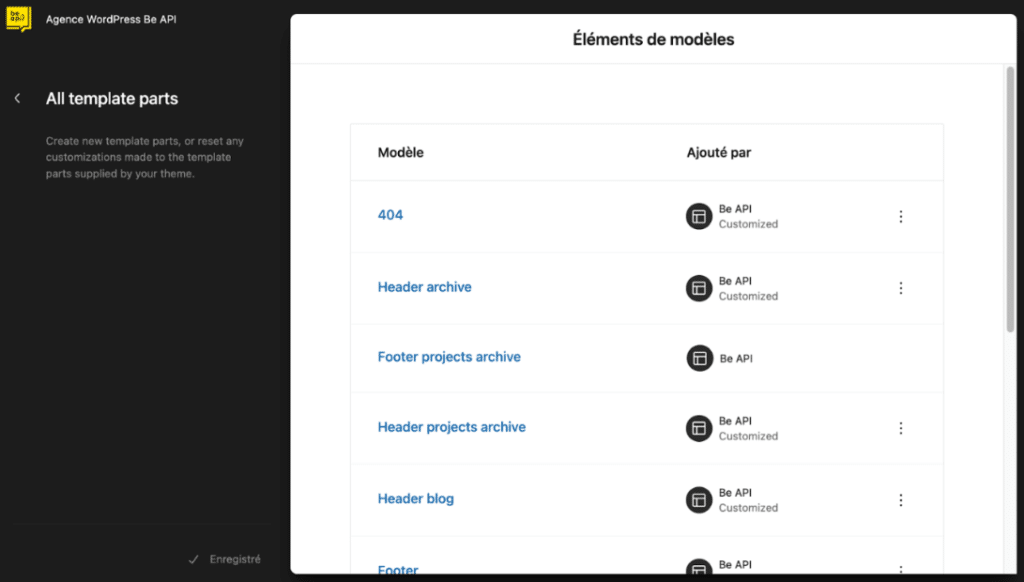
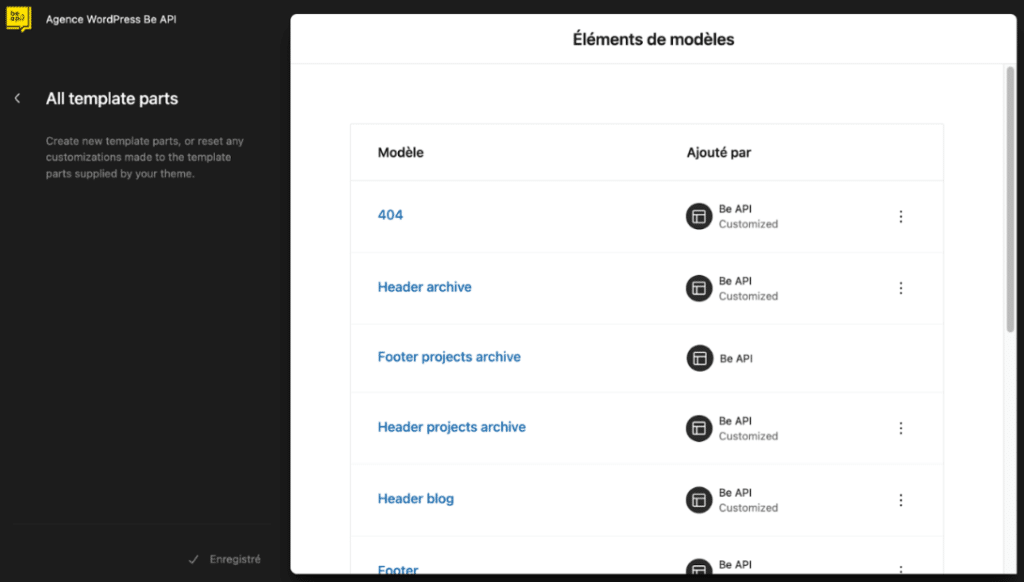
The different model elements are thus taxpayers in the publisher:
- 404
- Header of archives
- Blog Header
- Footer

What about the future?
If necessary in the future, nothing will prevent us from turning this hybrid theme into a 100% ESF theme. In any case, classic themes, including hybrids, will remain functional thanks to the retrocompatibility of WordPress.
When not to use a hybrid theme?
If you want to master the creation of a block-based theme, dive fully into this process without using PHP files. Moreover, theme generators are available to facilitate this process, thus avoiding starting from zero. Consider using a hybrid theme only in case of blocking in your approach.
Conclusion
The hybrid theme represents a judicious compromise between flexibility and precision in the design of WordPress sites. By offering a clever combination of traditional features and site editor capabilities, it meets the personalization and control needs of agencies and their clients. The redesign of the Be API website using a hybrid theme perfectly illustrates these advantages, allowing greater flexibility for the contribution teams, while maintaining accurate management of the critical elements of the site. In the future, the transition to entirely block-based themes remains an option, but hybrid themes will continue to play an important role through their backward compatibility and adaptability to the specific needs of projects. However, it is essential to recognize that hybrid themes are not suitable for all cases and that it is important to choose the solution best suited to the needs and objectives of each WordPress project.